Spring Security 이란?
Spring Security는 스프링 기반 애플리케이션에서 인증(Authentication)과 인가(Authorization)를 표준적으로 처리하기 위한 보안 프레임워크 입니다.
인증 VS 인가
- 인증(Authentication)
- 로그인처럼 사용자의 신원을 확인하는 절차를 의미합니다.
- “Who are you?”로 설명할 수 있습니다.
- 인가(Authorization)
- 인증된 사용자가 특정 리소스에 대한 접근 권한이 있는지 확인하는 절차를 의미합니다.
- “What can you do?”로 설명할 수 있습니다.
여기서 알 수 있는 부분은 인증 -> 인가 순서로 수행한다는 것입니다.
Spring Security 호출 구조
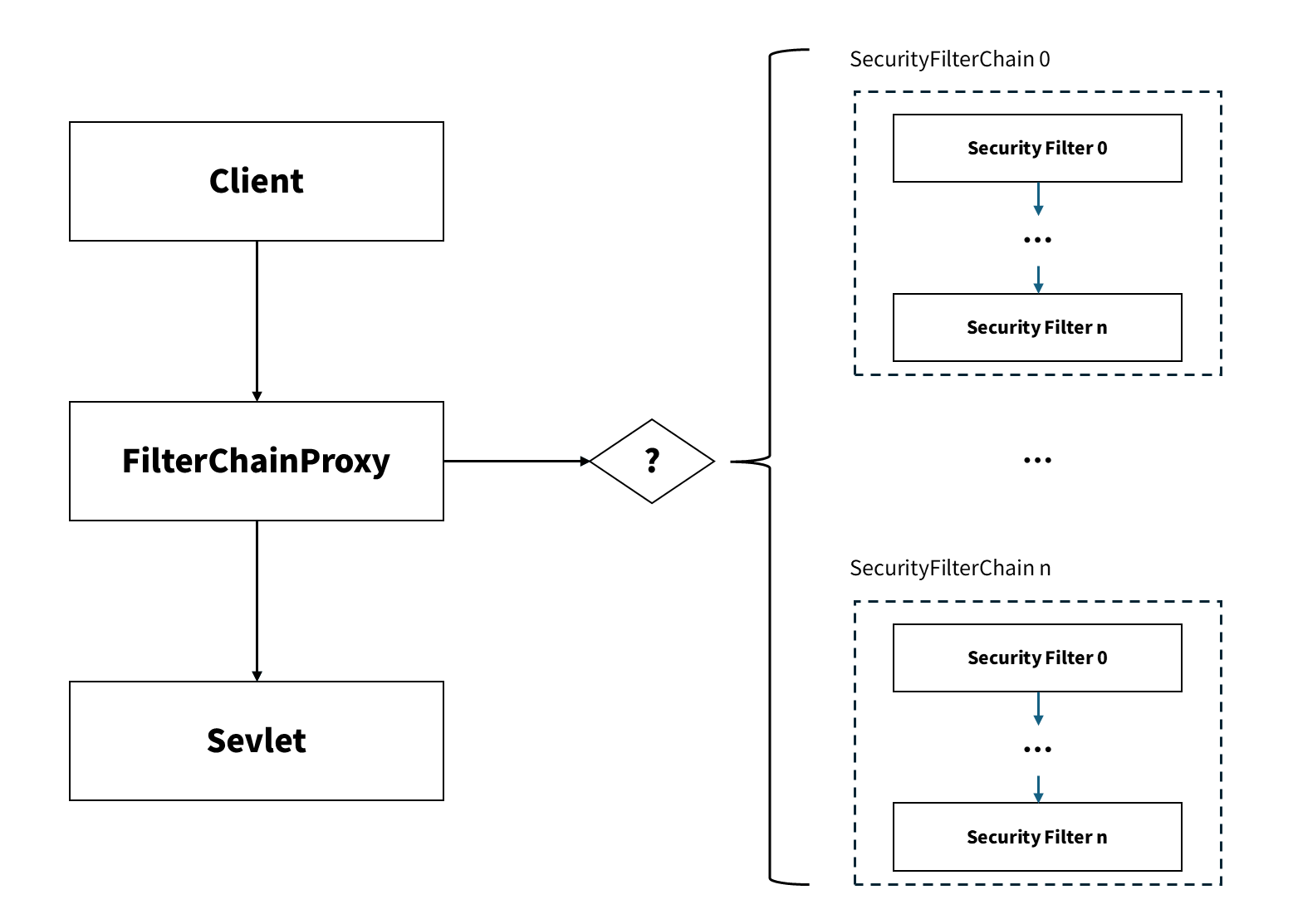 대략적인 호출 구조
사용자의 요청이 들어오면 FilterChainProxy에서 해당 요청에 맞는 SecurityFilterChain을 선택합니다. 선택된 SecurityFilterChain에 있는 Security Filter 들을 순차적으로 거쳐서 인증및 인가를 수행합니다. 성공할 경우에만 요청을 Sevlet으로 전달합니다.
FilterChainProxy- 사용자의 요청은
Sevlet Container Fitler Chain을 먼저 거치게 됩니다. 그 중DelegatingFilterProxy필터가Spring Security의FilterChainProxy로 위임한 것입니다. - 여기서 하는 일은 사용자가 구현한 적당한
SecurityFilterChain을 찾아서 인증/인가를 수행하는 것입니다.
- 사용자의 요청은
SecurityFitlerChain- 사용자가 직접 구현한 필터로, 인증/인가를 수행합니다.
- 기본적인 필터가 존재합니다.
ServletSecurityFitlerChain을 무사히 통과 (인증 및 인가에 문제없음) 후 최종적으로 사용자 요청을Controller에 전달하게 됩니다.
기본적인 SecurityFilterChain 구조
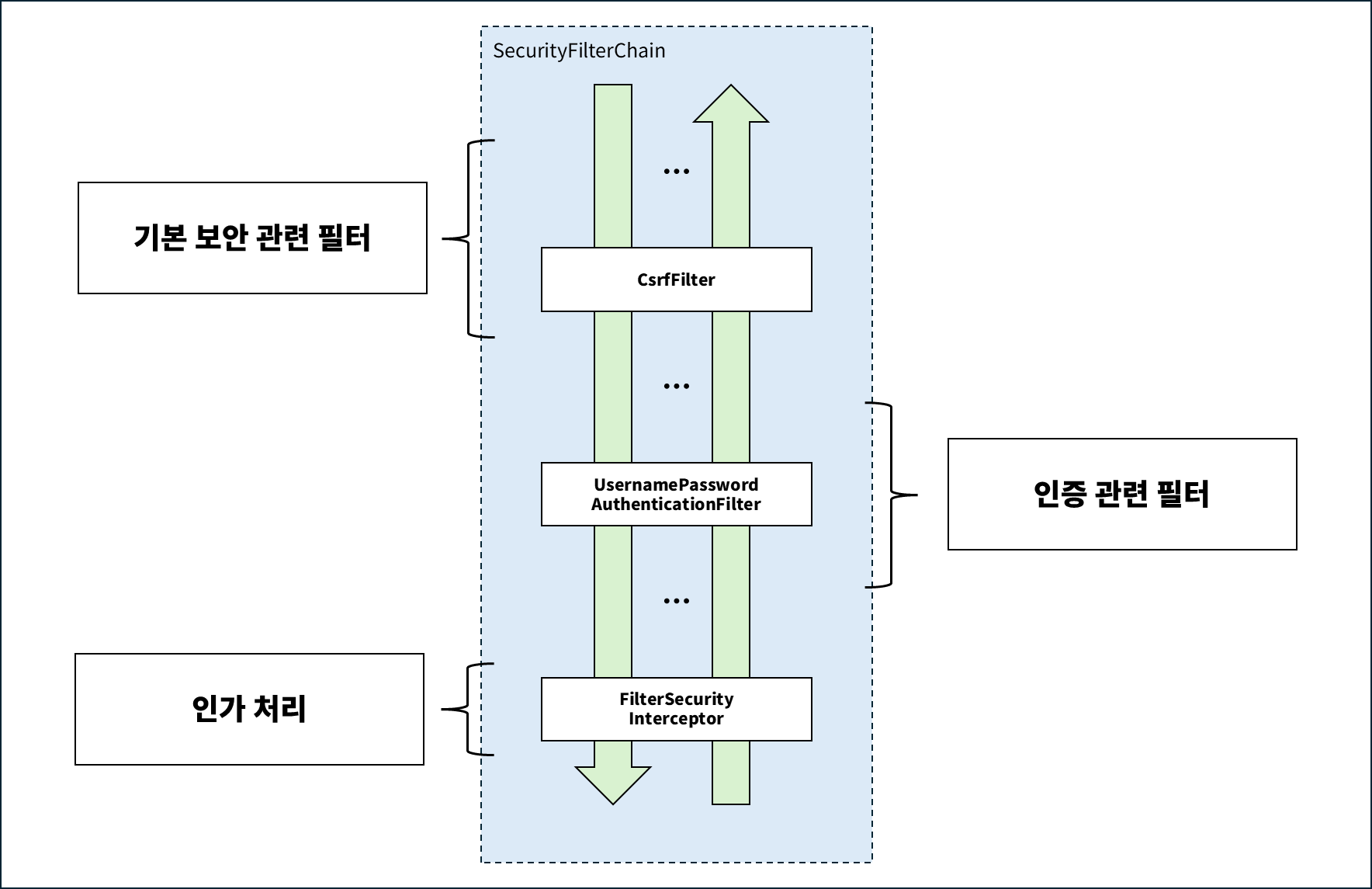 대략적인 기본 SecurityFitlerChain 구조
SecurityFilterChain은 인증 / 인가 / 보안 필터 그룹으로 나눠서 이해할 수 있습니다.
- 기본 보안 관련 필터
- 인증 처리와 별개로 동작하며, 요청 단계에서 보안 위협을 완화하는 역할을 수행합니다.
- csrf, session fixation 등 공격을 막아 줍니다.
HeaderWriterFilter,CsrfFilter,CorsFilter등 존재합니다
- 인증 관련 필터
- 사용자의 인증을 수행하는 필터입니다.
- Form Login, JWT, Oauth 등 다양한 인증을 제공해 주고 있습니다.
UsernamePasswordAuthenticationFilter,BearerTokenAuthenticationFilter등 존재합니다.
- 인가 관련 필터
FilterSecurityInterceptor로 최종적인 인가를 결정합니다.
SecurityFilterChain 추가
SecurityFilterChain은 다음과 같이 생성할 수 있습니다.
1
2
3
4
5
6
7
8
9
10
11
12
13
@Bean   // ------------------------------------------------------------------ 1
@Order(1) // ---------------------------------------------------------------- 2
SecurityFilterChain _name_(HttpSecurity http) throws Exception {
    http
        .securityMatcher("/**") // ------------------------------------------ 3
        .csrf(csrf -> csrf.disable())
        .addFilterAfter(myFilter, SomeFilter.class) // ---------------------- 4
        .addFilterBefore(myFilter, SomeFilter.class) // --------------------- 4
        .addFilterAt(myFilter, SomeFilter.class) // ------------------------- 4
        ;

    return http.build();
}
@Bean어노테이션- 필터 체인을 빈으로 등록하면
FilterChainProxy에서 이를 관리하게 됩니다. - 요청이 들어오면
FilterChainProxy가 등록된 체인 목록에서 요청 조건에 맞는 체인을 선택하여 적용합니다.
- 필터 체인을 빈으로 등록하면
@Order어노테이션- 숫자가 작을수록 우선순위가 높습니다.
FilterChainProxy는 등록된 필턴 체인들을 순서대로 검사하여 먼저 매칭되는 것을 선택합니다.- 따라서 여러 필터가 존재하는 경우에는 원하는 체인이 먼저 선택되도록 우선순위를 지정해야 합니다.
securityMatcher()- 해당 필터 체인이 적용될 URL 패턴을 지정합니다.
FilterChainProxy에서 요청 URL이 매칭 조건에 부합한 필터 체인을 찾아 결정합니다.- 즉, 어떤 API 요청에 어떤 필터 체인을 적용할지 정의하는 역할을 수행합니다.
addFilterAfter(),addFilterBefore(),addFilterAt()- 사용자가 정의한
SecurityFilter를 필터 체인에 추가할 때 사용되는 메소드입니다. - 기준이 되는 기존 필터를 중심으로 앞(Before), 뒤(After)에 추가하거나 해당 위치를 대체(at)하여 배치합니다.
- 주의:
addFilterAt을 사용하게 되면 기존 필터를 대체하게 됩니다.
- 사용자가 정의한
단, 필터가 하나인 경우에는
@Order와securityMatcher()는 설정하지 않아도 됩니다.
SecurityFilter 추가
1
2
3
4
5
6
7
8
9
10
11
12
13
14
15
import jakarta.servlet.*;

public class CunstomFilter implements Filter {
     @Override
    protected void doFilterInternal(
        HttpServletRequest request,
        HttpServletResponse response,
        FilterChain filterChain
    ) throws ServletException, IOException {
        // --- 필터내 수행하는 일 들 ...

        // 다음 필터로 넘어감 (필수)
        filterChain.doFitler(request, response);
    }
}
Servlet 표준 인터페이스인 Filter를 상속하여 구현하여 커스텀 필터를 만들 수 있습니다. 다만 이런 경우 요청이 내부적으로 여러 번 디스패치(Error, Async 등) 되는 경우 필터가 중복으로 실행될 수 있습니다. 따라서 요청당 한 번만 실행되도록 보장하는 OncePerRequestFilter를 상속하여 구현하는 것이 일반적입니다.
1
2
3
4
5
6
7
8
9
10
11
12
13
14
public class CustomAuthFilter extends OncePerRequestFilter {

    @Override
    protected void doFilterInternal(
        HttpServletRequest request,
        HttpServletResponse response,
        FilterChain filterChain
    ) throws ServletException, IOException {

        // --- 인증/토큰 검증 등 보안 처리 ---

        filterChain.doFilter(request, response);
    }
}
인증 과정
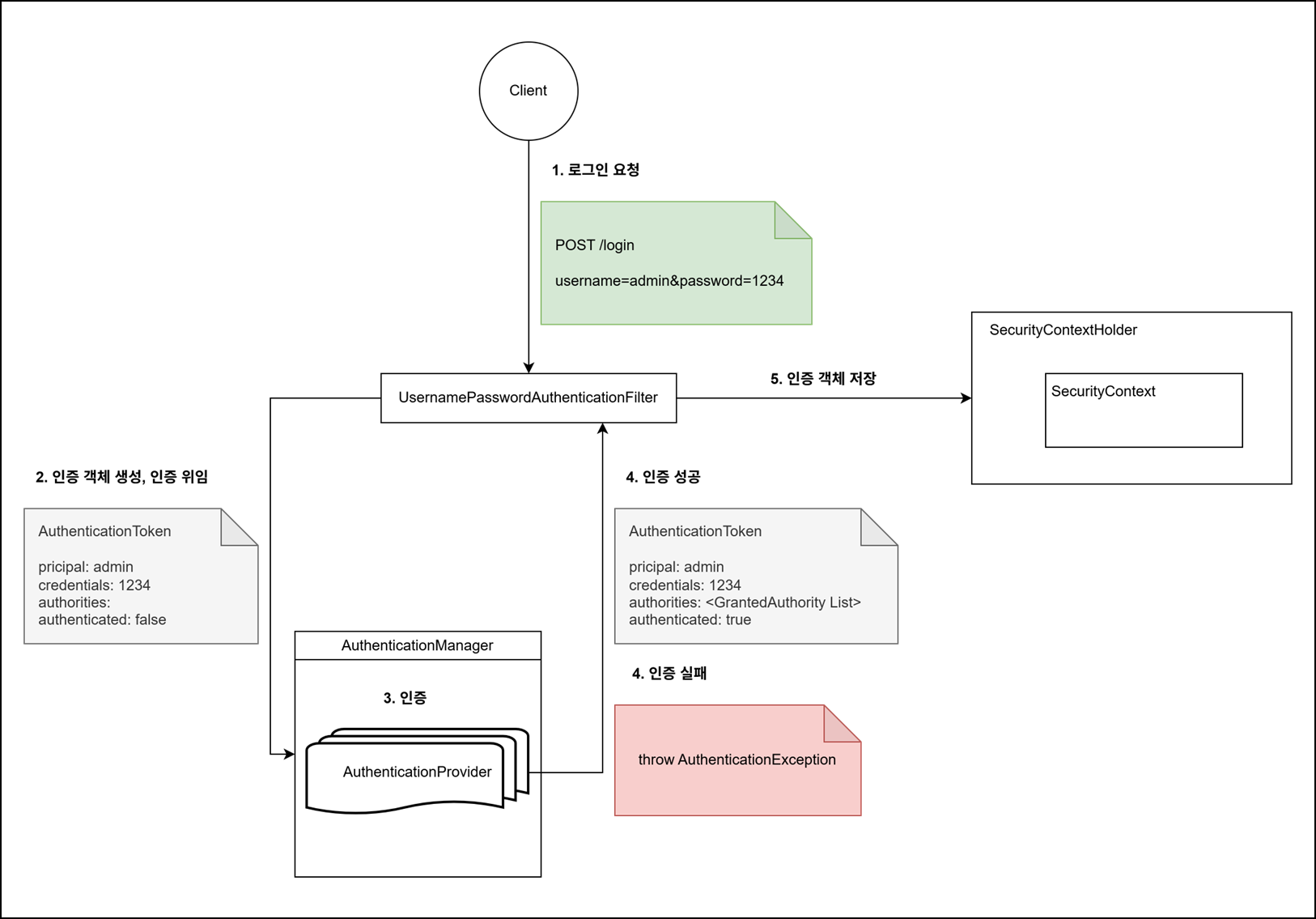
- 로그인 요청
POST /login으로 요청하면,UsernamePasswordAuthenticationFilter에서 해당 요청을 처리하게 됩니다.- 해당 필터는 username/password 기반 인증을 담당합니다.
필터 체인 설정에서
http.formLogin(f -> ...)을 통하여 다음 항목을 수정할 수 있습니다.f.loginProccessingUrl(): 로그인 처리 URL 변경
f.usernameParameter(): username 파라미터 이름 변경
f.passwordParameter(): password 파라미터 이름 변경 - 인증 객체 생성 및 인증 위임
UsernamePasswordAuthenticationFilter는 요청에서 username/password를 추출합니다.- 이를 사용하여 인증 전 상태를 나타내는
UsernamePasswordAuthenticationToken을 생성합니다. - 이후 실제 인증 처리는
AuthenticationManager에 위임합니다.
- 인증
AuthenticationManager에서는 전달받은 토큰을 처리할 수 있는AuthenticationProvider를 찾아서 위임합니다.AuthenticationProvider에서 사용자 조회 및 비밀번호 확인을 통하여 사용자를 인증합니다.- username/password 인증의 경우 일반적으로
DaoAuthenticationProvider에서 처리됩니다.
- username/password 인증의 경우 일반적으로
DaoAuthenticationProvider내부 로직UserDetailService인터페이스를 통하여UserDetail을 조회합니다.PasswordEncoder로 비밀번호 검증 후 사용자의 권한 정보를 로드합니다.
- 인증 성공 / 실패
- 인증 성공 ✅
authenticated = true상태의 Authentication 객체를 생성합니다.- 해당 Authentication 객체를 필터로 반환합니다.
- 인증 실패 ❌
AuthenticationException이 발생합니다.
- 인증 성공 ✅
- 인증 객체 저장
SecurityContextHolder.getContext().setAuthentication(authentication)- 인증이 성공이 되면 현재 인증 객체를
SeucurityContext에 저장합니다.
인가 과정
Spring Security 5.x 이하 버전에서는 FilterSecurityInterceptor를 사용하고, 6+ 버전에서는 AuthorizationFilter를 사용하여 인가를 수행합니다.
두 방식 모두 현재 요청과 SecurityContext에 저장된 Authentication 객체를 참조하여 접근 허용 여부를 판단합니다.
5.x 이하 버전
- 요청 URL에 필요한 권한을 조회한 뒤 투표로 결정하는 구조 입니다.
- 여러 개의 AccessDecisionVoter(
hasRole(),isAuthenticated()등)가 인가 여부를 평가하고AccessDecisionManager가 모든 결과를 모아서 최종적으로 결정하는 방식입니다. - URL 접근 권한 설정
1
2
3
4
5
6
7
8
  @Override
  protected void configure(HttpSecurity http) throws Exception {
      http
          .authorizeRequests()
              .antMatchers("/public/**", "/login").permitAll()
              .antMatchers("/admin/**").hasRole("ADMIN")
              .anyRequest().authenticated();
  }
6+ 버전
- 요청 URL과 매칭되는 AuthorizationMananger를 선택하여 인가 결정을 위임하는 구조입니다.
- URL 접근 권한 설정
1
2
3
4
5
6
7
8
9
10
11
  @Bean
  SecurityFilterChain securityFilterChain(HttpSecurity http) throws Exception {
      http
          .authorizeHttpRequests(auth -> auth
              .requestMatchers("/public/**", "/login").permitAll()
              .requestMatchers("/admin/**").hasRole("ADMIN")
              .anyRequest().authenticated()
          )

      return http.build();
  }
참고 문헌
- https://docs.spring.io/spring-security/reference/servlet/architecture.html
- https://docs.spring.io/spring-security/reference/servlet/authorization/architecture.html
- https://whitewise95.tistory.com/279
- https://javadevjournal.com/spring-security/spring-security-authentication/
- https://whitewise95.tistory.com/279